Vibe Coding Guide · Vibe Coding / Security
Vibe coding security: API keys and your database
What to tell your AI about API keys, how to check whether one is already public, and how to close and test a Supabase or Firebase database.
· 9 min read · by Hadi Vahidi
An AI can build you a working app in an afternoon. It will not always keep your keys out of the browser or your database closed to strangers, unless you ask. This guide goes with my vibe coding reels on security: what to tell your AI about API keys, how to check whether a key is already public, how to close a Supabase or Firebase database, and how to test it the way a stranger would.
01 What to tell your AI about API keys
One of October 2026's best-known incidents started with a key that had been deleted. LiteLLM's own postmortem tells it: on 27 May a configuration file holding an administrative key was committed to a public repository, and "about three hours later a follow-up commit deleted the file". But the old commit stayed in the repository's public history, and "because of human error, nobody followed through on revoking the administrative key", so it was "still valid more than four months later". On 10 October an attacker used it to take control of one of LiteLLM's platforms, and on 21 October a poisoned LiteLLM release, built to steal API keys, was published to the Python Package Index.
Deleting a key from your code does not delete it from your history, or from anyone who copied it. These seven rules stop most of it before it starts:
- No secret keys in front-end code. Anything that runs in the browser can be read by anyone who opens your site.
- Know which variables reach the browser. In Vite, every variable starting with
VITE_is written into the JavaScript your visitors download; in Next.js, every variable starting withNEXT_PUBLIC_. Never put a secret behind those prefixes. - Call paid APIs from your server only. The browser asks your server; your server holds the key and calls OpenAI, Anthropic or Stripe.
- Keep your .env file out of git. Add it to
.gitignorebefore your first commit, not after. - Give each key only the access it needs. Many providers let you limit a key to one project, read-only access or certain endpoints. A leaked narrow key does less damage.
- Scan for secrets before you push. GitHub's push protection, or a tool such as gitleaks, stops a commit that contains something that looks like a key.
- Leaked a key? Rotate it. Make a new key, switch your app to it, and revoke the old one. Deleting isn't enough.

VITE_ variable, written in plain text. (A fake key.)Keep every secret API key out of the front end. Any variable starting with VITE_ or NEXT_PUBLIC_ ends up in the browser, so never put a secret there. Call paid APIs only from server code, keep .env in .gitignore, give each key the least access it needs, and set up secret scanning before we push. If a key has ever been committed, tell me so I can rotate it.
This reel ends on "Do you know how to check if your key is already public?" That is the next section.
02 Is your API key already public? Check in a minute
Speed matters here. Wiz looked at two cases of stolen AI credentials in October 2026, and in both the first unauthorised use "happened within 30 minutes of the reported credential access". Three checks, in the order a stranger would look:
- View your live site's source. Open your site and press Ctrl + U (Cmd + Option + U on a Mac). Look for keys in the page itself, and note the JavaScript files it loads.
- Search every file in DevTools. Open DevTools (F12), go to Sources and press Ctrl + Shift + F (Cmd + Option + F on a Mac) to search all of them at once. Search for
sk-,keyandsecret. OpenAI and Anthropic keys start withsk-; Stripe secret keys start withsk_live_. - Search your repository's history too. A key you removed last week is still in old commits. This lists every commit, on every branch, that added or removed the text:
git log -p --all -S "sk-"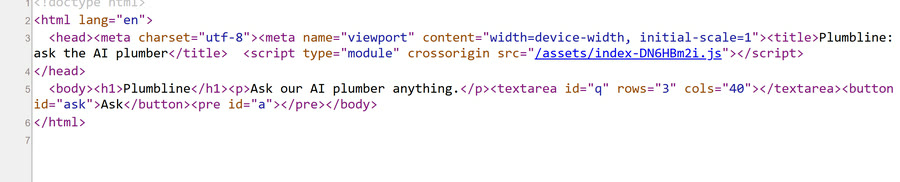
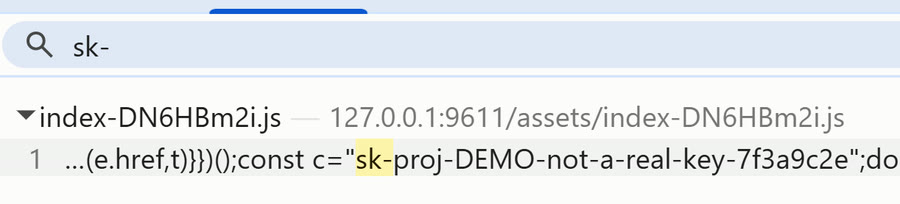
sk-. One result, the fake key.This reel ends on "Do you know how to cap the bill if someone uses it?" That is in the vibe coding costs guide.
03 Is your database open? Supabase and Firebase rules
UpGuard looked at apps built on Supabase and reported, on 14 October 2026: "Across the candidate set we identified 16,326 databases exposing readable tables." A Supabase app talks to its database straight from the browser, so the only thing standing between a stranger and your tables is the rules you set on them.
Supabase has tightened its defaults: new tables are no longer exposed to its Data API automatically, which it enforced on all projects from 30 October 2026. That helps with new tables. It does not help with tables made before, or with a table your AI opens up with a GRANT to make a "permission denied" error go away. Seven things to tell your AI:
- Turn on Row Level Security for every table. With RLS off, Supabase's own dashboard warns that the table "can be accessed by anyone via the Data API".
- The publishable key is public. That's fine, with rules. Supabase calls it "safe to expose online" and adds: "Anyone can read it, so it only reaches what Row Level Security allows." (Older projects call it the anon key.)
- A policy for read, insert, update and delete. RLS with no policies returns nothing to anyone. Each policy says who may do what; the usual rule is that a signed-in user only touches rows where
user_idis their own id. - Never put the secret key in a browser. In Supabase's words: "A secret key bypasses every Row Level Security policy you have." It belongs on your server only. (Older projects call it the service_role key.)
- On Firebase, never "allow read, write: if true". Firebase's own documentation shows that rule under the warning "NEVER use this ruleset in production".
- Keep storage buckets private, and share with signed links. A public bucket serves every file to anyone with the address. A signed link works for a set time and then stops.
- Then test as a stranger, and as another user. The next section shows how.

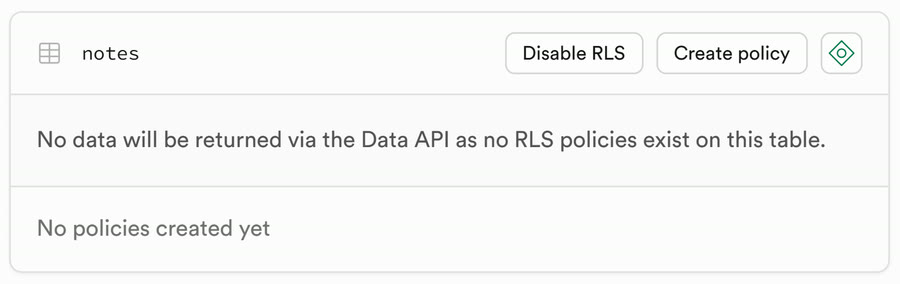
The four policies from my test app, one per action. (select auth.uid()) is the id of whoever is signed in:
create policy "Read own notes" on public.notes
  for select to authenticated
  using ((select auth.uid()) = user_id);

create policy "Add own notes" on public.notes
  for insert to authenticated
  with check ((select auth.uid()) = user_id);

create policy "Edit own notes" on public.notes
  for update to authenticated
  using ((select auth.uid()) = user_id)
  with check ((select auth.uid()) = user_id);

create policy "Delete own notes" on public.notes
  for delete to authenticated
  using ((select auth.uid()) = user_id);
The same idea on Firebase: the open rule out, an owner-only rule in.
match /users/{userId}/notes/{noteId} {
-  allow read, write: if true;
+  allow read, write: if request.auth != null
+    && request.auth.uid == userId;
}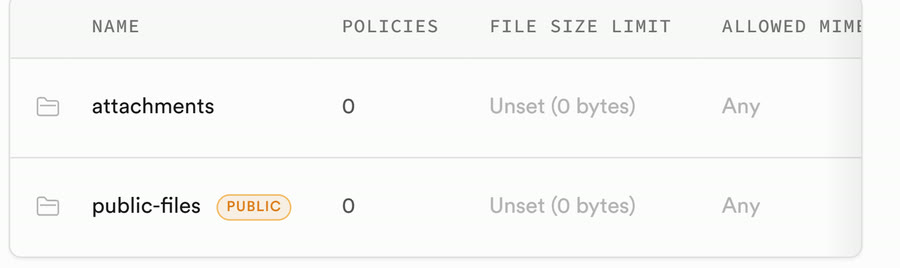
attachments is private, public-files is marked PUBLIC.Turn on Row Level Security for every table, including old ones. Add policies for select, insert, update and delete that only let a signed-in user touch rows where user_id = auth.uid(). Never fix a permission error by granting access to anon without a policy. Use only the publishable key in the browser; the secret (service_role) key stays on the server. Make storage buckets private and share files with signed URLs that expire.
This reel ends on "Do you know how to test your database as a stranger?" That is the next section.
04 Test it as a stranger, and as another user
Rules you have not tested are rules you hope work. Four tests, each of which should fail:
- Signed out, with only the public key. Ask your API for a table, sending nothing but the publishable key, the way any visitor's browser could:
curl "https://YOUR-PROJECT.supabase.co/rest/v1/notes?select=*" \
-H "apikey: YOUR_PUBLISHABLE_KEY"- Read other people's rows. The answer to the request above should be
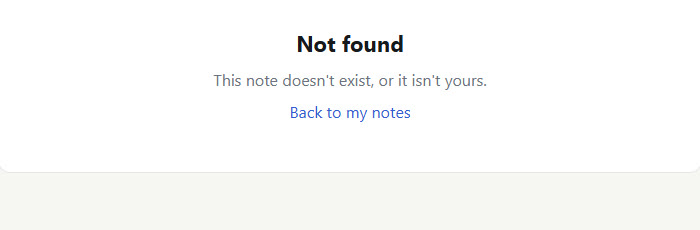
[], an empty list. On my test app, with RLS off, the same request returned all five notes of both made-up users; with RLS and the four policies on, it returned[]. - Sign in as user B and open user A's link. Make a second account, sign in, and paste the address of something that belongs to the first one. You should get "not found" or a refusal, never the content.
- Change the ID in the address. Most apps show a record's id in the URL (
/note/4248a185-…). Change it to another id and press Enter. Again: nothing.
05 Sources
- LiteLLM, "The attack chain behind the v1.107.0 LiteLLM release", 23 October 2026: docs.litellm.ai
- Wiz, "Black October" for AI developer platforms, 30 October 2026: wiz.io
- UpGuard, "Everything Everywhere: Systemic Data Exposure in Supabase Apps", 14 October 2026: upguard.com
- Supabase, API keys (publishable and secret keys): supabase.com
- Supabase changelog, "Breaking Change: Tables not exposed to Data and GraphQL API automatically", 28 April 2026: supabase.com/changelog
- Firebase, Avoid insecure rules: firebase.google.com
Sources read between 3 and 9 November 2026.